
Vector memory in Qdrant
HAPP stores conversation embeddings in your Qdrant cluster
so every assistant remembers context across sessions and queries your knowledge base in real time
 Telegram
 Viber
Viber Instagram
 Facebook
 WhatsApp
What Qdrant gives your assistant
Long-term memory, RAG retrieval, and millisecond vector search — your data lives in your Qdrant, HAPP just reads and writes.
 Long-term memory
Assistant remembers across sessions
Every chat, call, and form submission is embedded and stored — the assistant recalls relevant past interactions when a customer returns.
Ground answers in your knowledge base
Upload product docs, FAQs, policies — the assistant retrieves the right passage before answering, citing the source.
FAQ #14
Discount tiers
Policy
Wholesale terms
Pricing
Volume breakpoints
Vector queries under 50ms
Qdrant's Rust core keeps similarity search sub-50ms even at millions of vectors — no perceptible pause in live conversations.
Similarity search · 1.2M vectors · single replica
Your data, your infrastructure
Qdrant Cloud, Docker, Kubernetes — HAPP works the same way. Sensitive data never leaves your perimeter if you don't want it to.
Qdrant Cloud
Managed · 5 min setup
Self-hosted
Docker · K8s · bare metal
OpenAI, Cohere, custom — your choice
Configure which embedding model HAPP uses. Switch later without touching code — your collection migrates automatically.
distance · cosine
Millions of vectors, no slowdown
Sharding, replication, and HNSW indexing handle production workloads — from 10K conversations to billions of points.
Avg search latency · single-node HNSW
Isolate clients and environments
One Qdrant cluster, many isolated collections — separate dev/prod or client-A/client-B without standing up new infrastructure.
vectors
vectors
vectors
vectors
See how Qdrant plugs in
Click each step — it's the real platform, just paused for you.
Step 1: Find the integration
Open Integrations → Qdrant
What you need to connect
A short checklist — once you have these four things, the rest takes under three minutes.
Qdrant Cloud account
Sign up at cloud.qdrant.io — free tier is enough to start. (Already have a Qdrant somewhere else? Self-hosted works too — instructions below.)
A cluster created
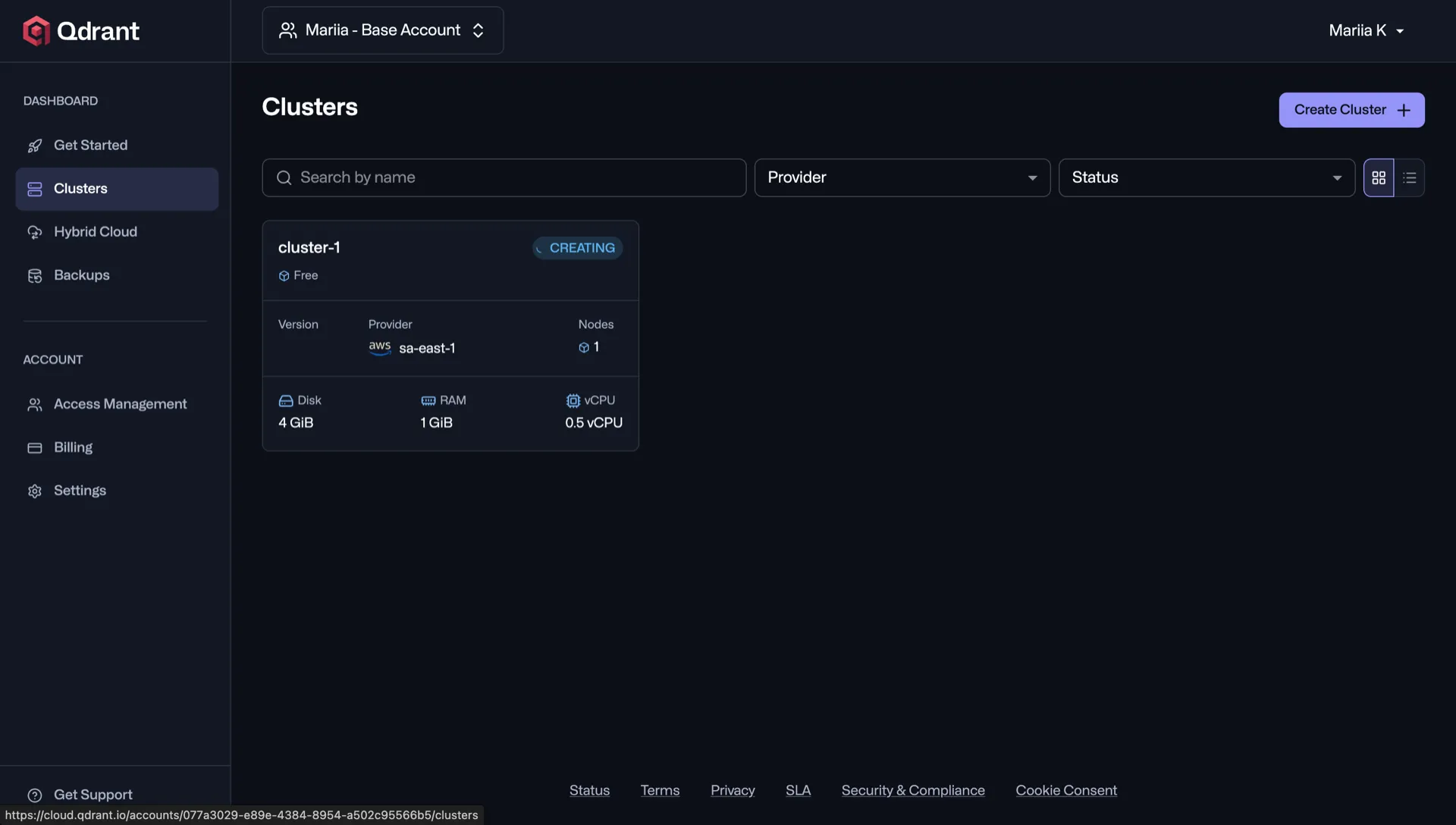
In Qdrant Cloud click «Create Cluster» — pick a region and free plan, takes about 30 seconds to provision.
Endpoint + API key from your cluster
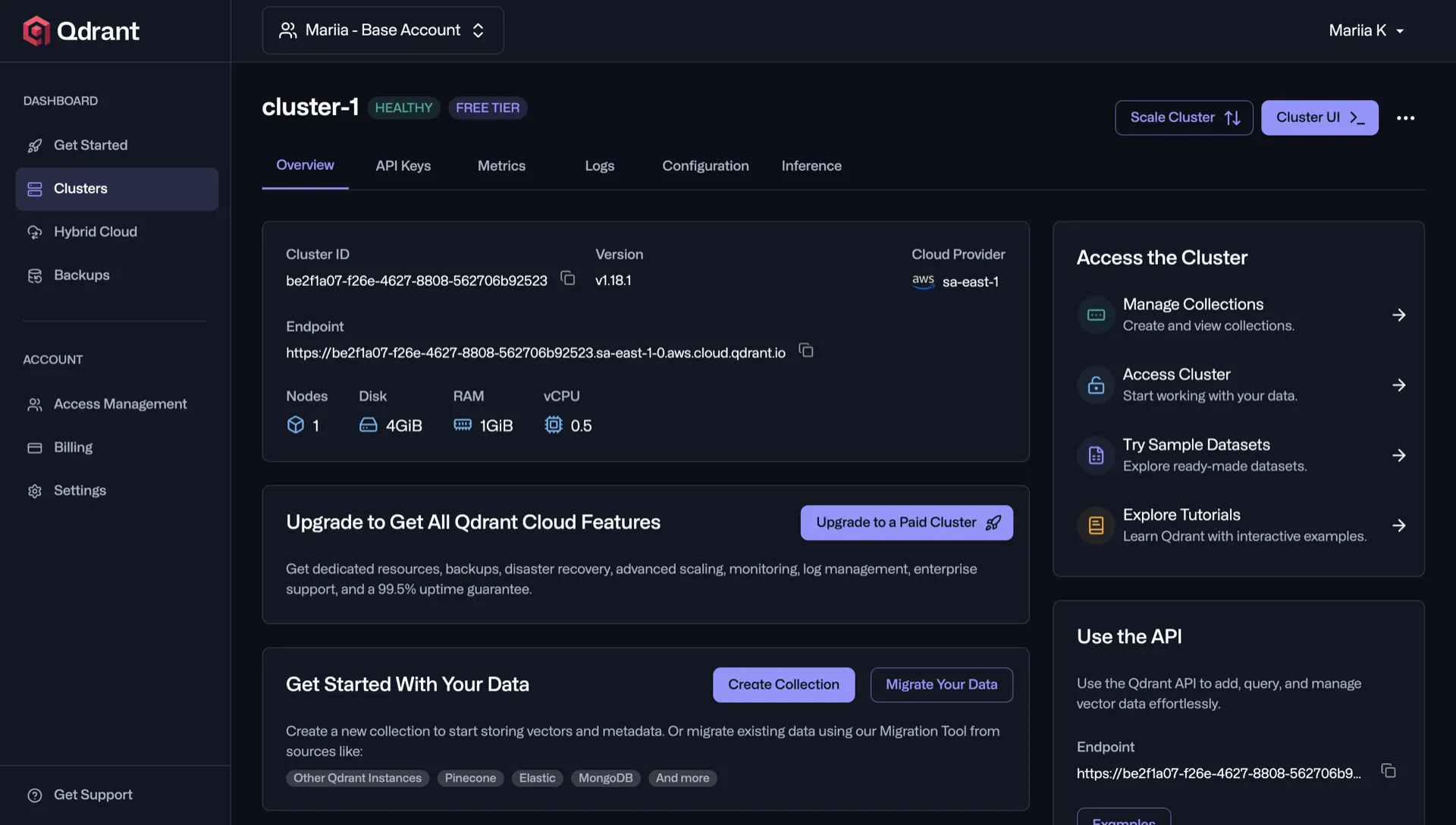
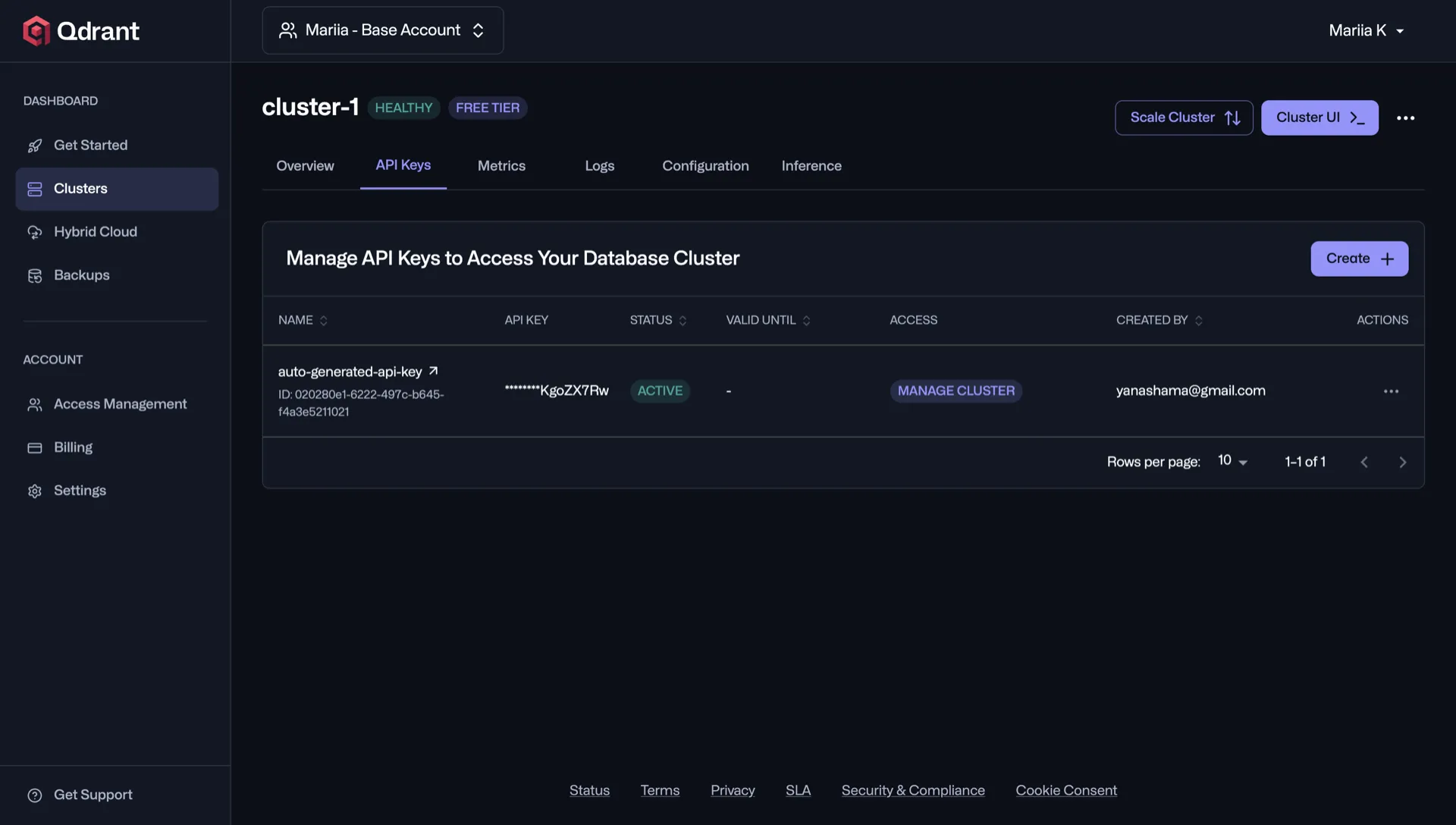
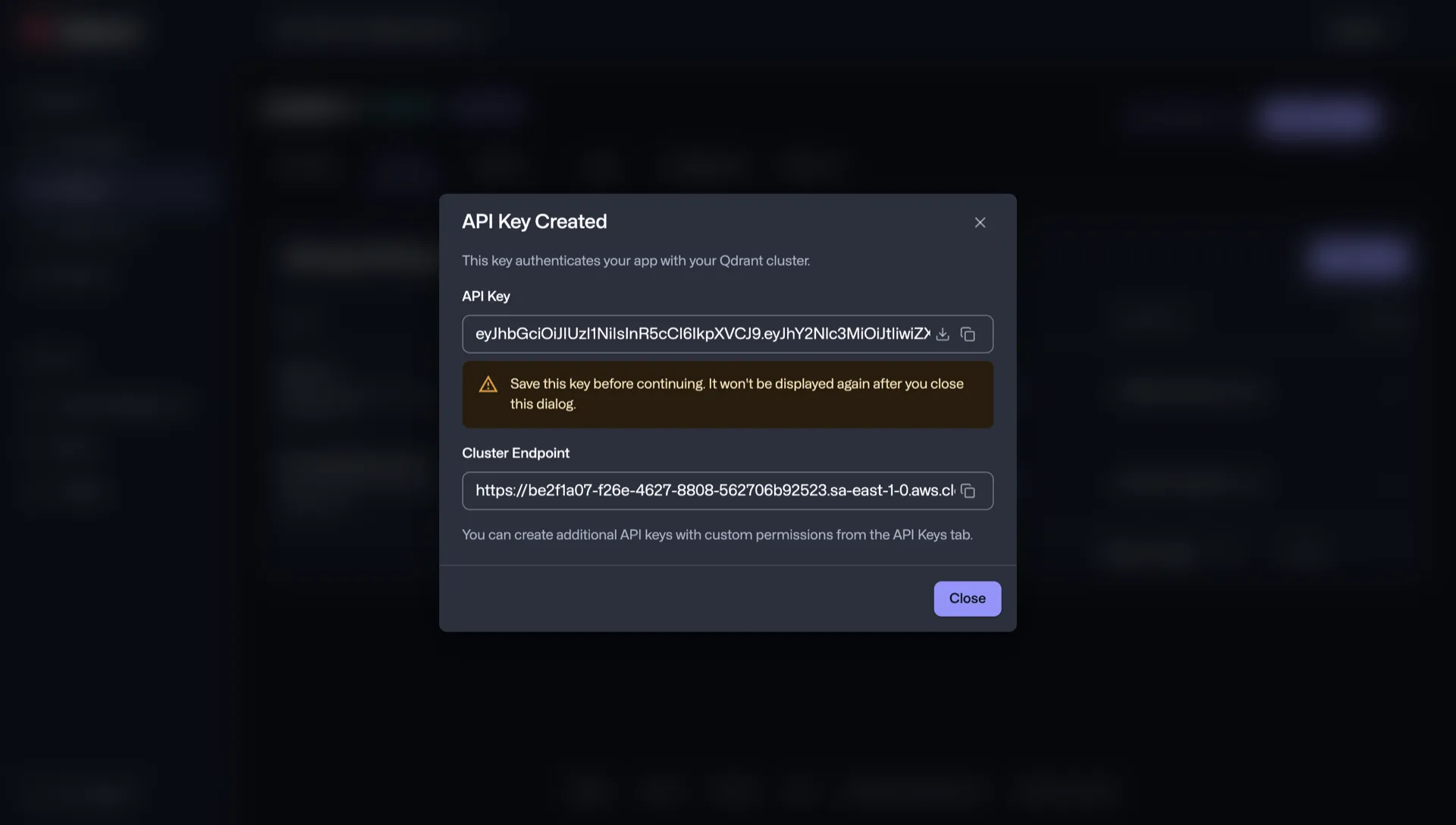
Open your cluster — the «Endpoint» field at the top is the URL you'll paste into HAPP. The API key you create in «API Keys» tab. Both shown clearly on the cluster page.
Where exactly to find them?HAPP account with assistant memory
Active HAPP workspace at my.happ.tools with at least one assistant. Vector memory lets your assistant recall context across conversations.
Where exactly to find your API key
Three clicks inside Qdrant Cloud and the key is yours — self-hosted users grab it from their env config.
Open your cluster in Qdrant Cloud
Head to cloud.qdrant.io, sign in, and open the cluster you want HAPP to use.
Open the «API Keys» tab and click Create
Inside the cluster, switch to the API Keys tab and click the Create button.
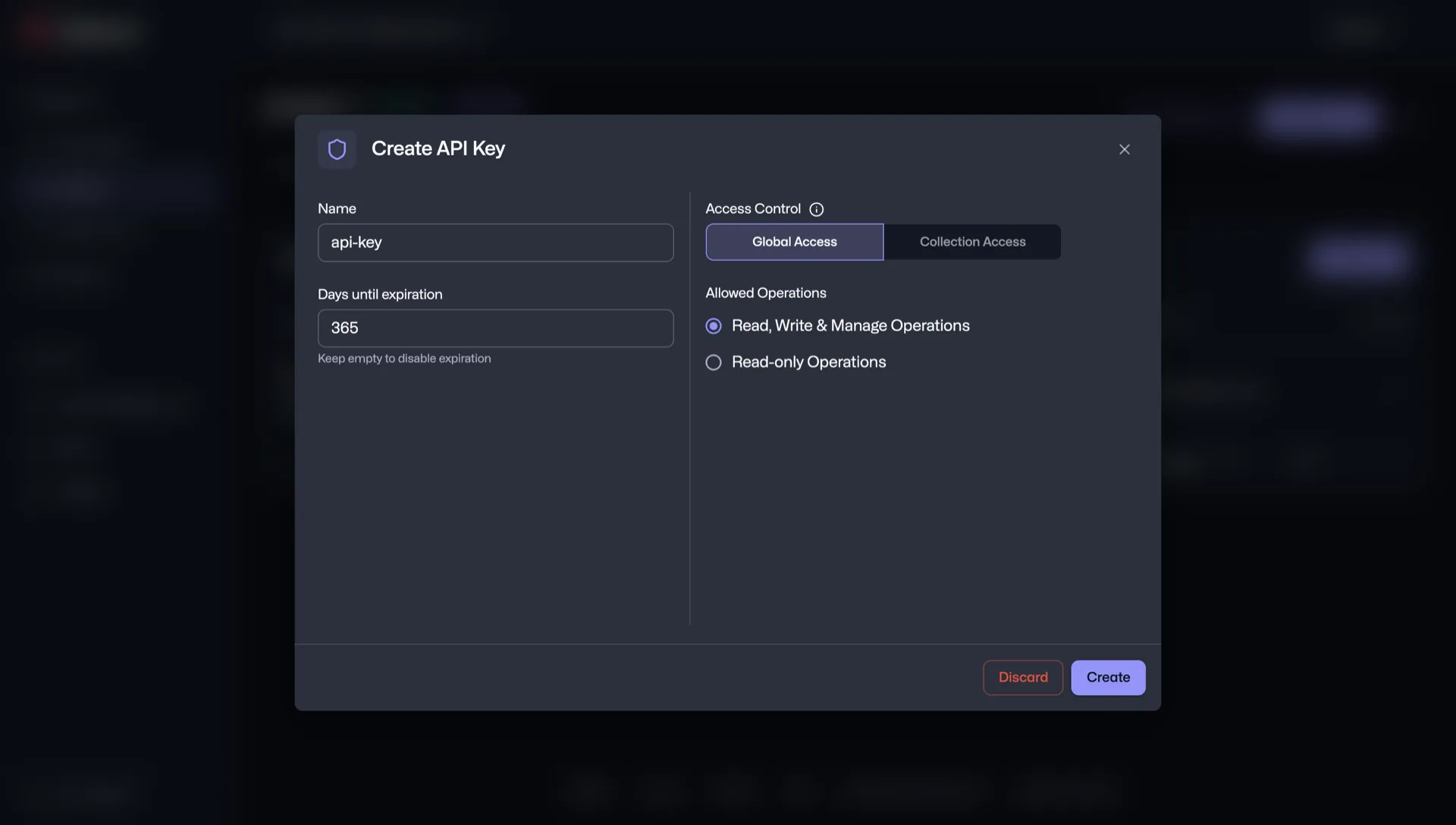
Generate a read/write key and save it
Give it a name, set expiration to 2+ years, and copy the generated token — it won't be shown again.
How you'll know it's connected
When HAPP successfully reaches your Qdrant cluster and writes a test vector, your Qdrant card flips to Connected — same green pill as other integrations.

Ассистент по прийому інтернет-замовлень на покупку гаджетів
 Call Webhook
Account Information
https://api.happ.tools/api/voice-assistant-webhooks/call-event
06.02.2026, 14:41
 Telegram Push
Account Information
Slava Saloid
24.01.2026, 16:53
QdrantAccount Information
happ-tools.qdrant.me
08.02.2026, 16:22
Green "Connected" pill
The blue Choose button is replaced by a green pill — assistant memory is now backed by your cluster.
Cluster URL + collection visible
Your endpoint and the active collection name are shown on the card — easy to audit and switch.
Vector count growing
A counter shows how many vectors the assistant has written — every chat, call, and form submission adds points.
Settings & disconnect at hand
opens collection settings (embedding model, distance metric), gives you Disconnect — no hunting through menus.
What to do if it won't connect
Every Qdrant error has a specific cause — find yours and fix it in under a minute.
Support
Can't find your error?
Our team will look at your Qdrant setup individually — share the error and we'll point at the exact fix.
Contact support →API key
Invalid API key
INVALID_API_KEY
Re-copy the key without leading/trailing spaces. Use a read/write key from Qdrant Cloud → Cluster → API Keys — not a read-only one.
Quota
QUOTA_EXCEEDED
Cluster quota exceeded
Qdrant Cloud free tier hit its vector limit. Upgrade the cluster in cloud.qdrant.io → Billing, or migrate to self-hosted for unlimited vectors.
Network
Cluster unreachable
CLUSTER_UNREACHABLE
HAPP can't reach your endpoint. For self-hosted: open the port (default 6333/6334) to HAPP's egress IPs, or use Qdrant Cloud.
Collection
Collection not found
COLLECTION_NOT_FOUND
HAPP can create the collection automatically — toggle "Auto-create collection" in Integration Settings.
Writes
Vectors aren't being written
VECTORS_NOT_WRITING
Three things to check, in order:
- 1HAPP → Integrations → Qdrant → Settings — collection name is selected and exists in your cluster.
- 2Embedding model is configured (OpenAI key in HAPP, or a local model endpoint).
- 3Qdrant Cloud → Cluster → API Keys → the key in use has write permissions, not read-only.
FAQ
Answers to the most common questions about the Qdrant integration with HAPP.
Is my data private — does it leave my Qdrant cluster?
No. Vectors live in your cluster — HAPP only reads and writes through your API key. Self-hosted Qdrant: nothing leaves your perimeter. Qdrant Cloud: data sits in your tenant under your terms with Qdrant Solutions.
Which embedding model does HAPP use?
OpenAI text-embedding-3-small by default (1536 dimensions). You can switch to text-embedding-3-large, Cohere, or a self-hosted sentence-transformer in HAPP → Integrations → Qdrant → Settings.
Can I switch embedding models later?
Yes. HAPP re-embeds historical conversations into a new collection in the background — no downtime, no manual migration. Old collection is kept for 30 days before deletion.
Self-hosted vs Qdrant Cloud — which should I pick?
Cloud is the fast path: managed cluster, HTTPS endpoint, ~5 minutes to running. Self-hosted (Docker / K8s) is for compliance reasons (data residency, air-gapped) or when you already run vector workloads.
How many vectors before performance degrades?
Qdrant comfortably handles 10M+ vectors per collection on a single node. Sub-50ms similarity search holds across this range. Beyond that, sharding kicks in automatically on Cloud (manual on self-hosted).
Can I connect multiple Qdrant clusters to HAPP?
Multiple. Each cluster is a separate integration with its own URL and API key. Useful for splitting dev/prod or isolating clients (multi-tenancy). Plans differ by the number of connected clusters — see HAPP → Billing.
What happens to vectors if I disconnect the integration?
All vectors stay in your Qdrant cluster untouched. The assistant simply stops writing new ones and stops querying for context until you reconnect — no data is deleted on either side.
Disconnecting and reconnecting
What happens to your vectors and settings, and how to safely turn the integration off or on.
Disconnect
How to disconnect Qdrant
Three steps — the assistant stops writing new vectors, your cluster keeps everything.
- 1Go to HAPP → Integrations → Qdrant.
- 2Click "Disconnect" next to the connected cluster.
- 3Confirm the action in the dialog.
What happens after disconnecting
- Assistant stops writing new vectors to your cluster
- All existing vectors stay in Qdrant untouched
- Assistant continues to work — it just loses long-term memory until reconnected
- API key is not revoked in Qdrant — revoke it there separately if needed
Reconnect
How to reconnect Qdrant
Three steps — the same cluster URL and API key restore everything.
- 1Go to HAPP → Integrations → Qdrant.
- 2Click "Connect", enter your cluster URL and API key.
- 3Settings, collection mapping and embedding model selection reattach to the integration.
What is preserved after reconnecting
- Collection name and embedding model selection
- Custom payload mapping (metadata fields)
- Assistant → collection binding
- All existing vectors are immediately queryable again